Dozens of tab switches a day
On a busy day every agent jumps between Zendesk and Shopify again and again, and the customer waits through every one of them.
Free Shopify Order Actions
Free Shopify Order Actions is a free Zendesk app that puts the customer's Shopify orders in the ticket sidebar. Your agents refund, cancel, change the address or the items and re-order right there, and every change is noted on the ticket.
Order
#24817 · $128.00 · Paid
Tracking
UPS 1Z9X481A0344712290
Customer asks
Can you send it to my new address?
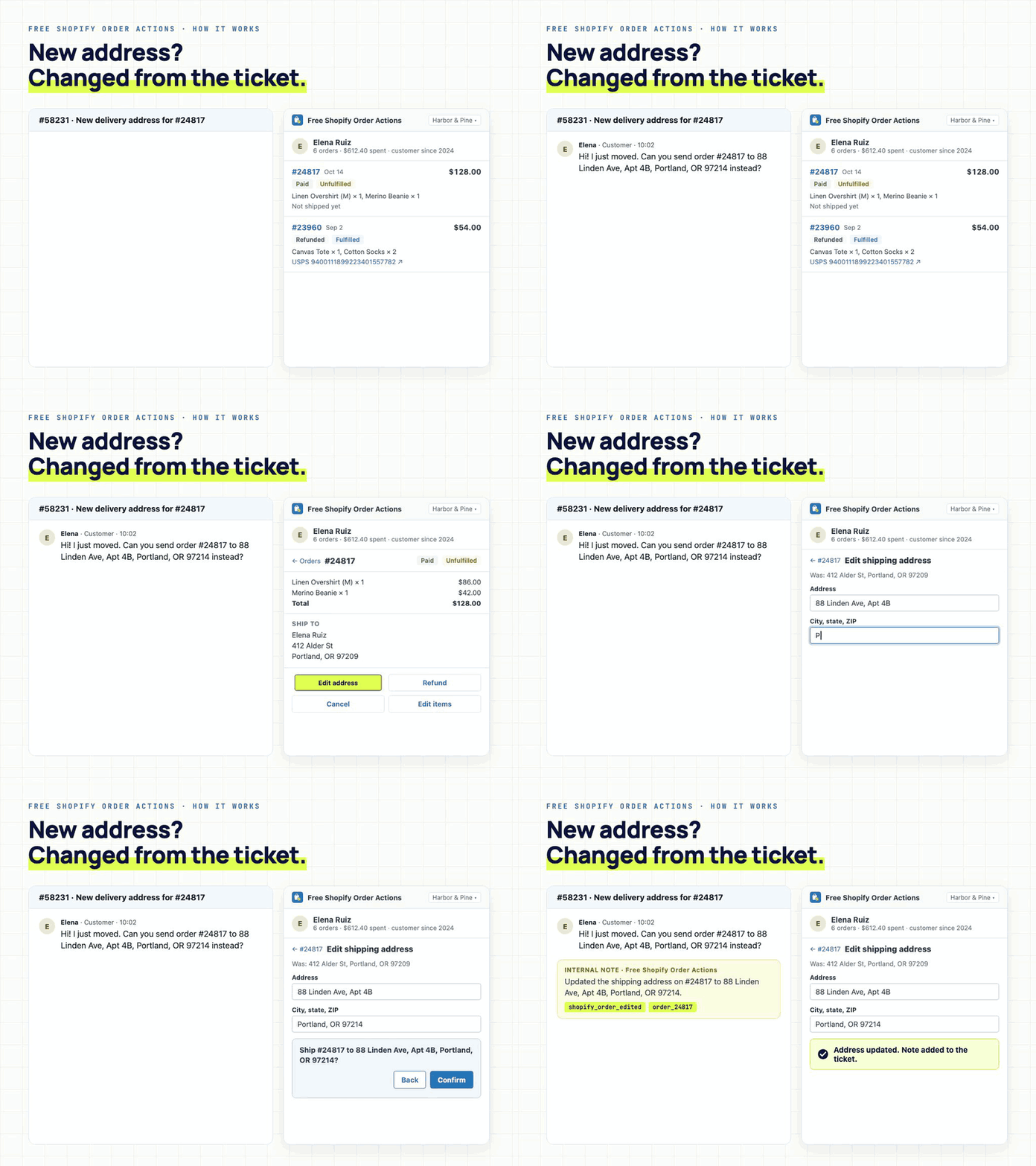
The agent edits the shipping address in the sidebar and confirms the change.
Shopify is updated, and an internal note and the shopify_order_edited tag land on the ticket.
Free
Every feature, every agent
$0
No per-agent fees
< 1 min
Connect your store
SOC 2
Type II certified
Problem
A customer writes in about a wrong size, a new address or a double charge. Your agent opens Shopify, hunts for the order, makes the change and comes back to type out what they did.
On a busy day every agent jumps between Zendesk and Shopify again and again, and the customer waits through every one of them.
Changes made in Shopify leave nothing on the ticket unless the agent writes it up, so the next agent has to go and check.
How it works
The app matches the requester by email or phone and lists their orders in the sidebar, with items, totals, status and tracking links in view.
Open a ticket and their Shopify orders are already in the sidebar. You can also search by order number, email, name or phone.
Refund, cancel, edit the address or the items, re-order, or build a new order and send the invoice.
Every change asks you to confirm first. Then the app adds an internal note and a tag to the ticket so Explore can report on it.
Product walkthrough
Watch an agent open the order in the sidebar, change the shipping address and confirm, with the note added to the ticket.
Demo walkthrough
Elena asks to ship order #24817 to her new address. The agent changes it from the sidebar in a few clicks.
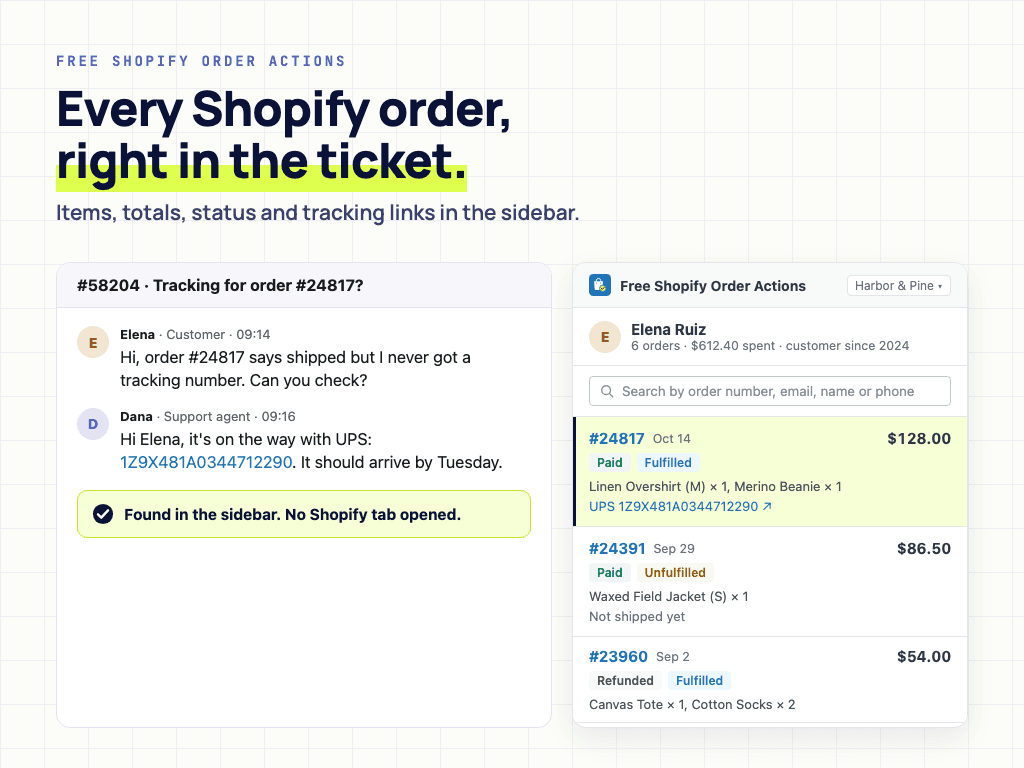
Order number, items, total, payment and fulfilment status and the tracking link, right in the list.
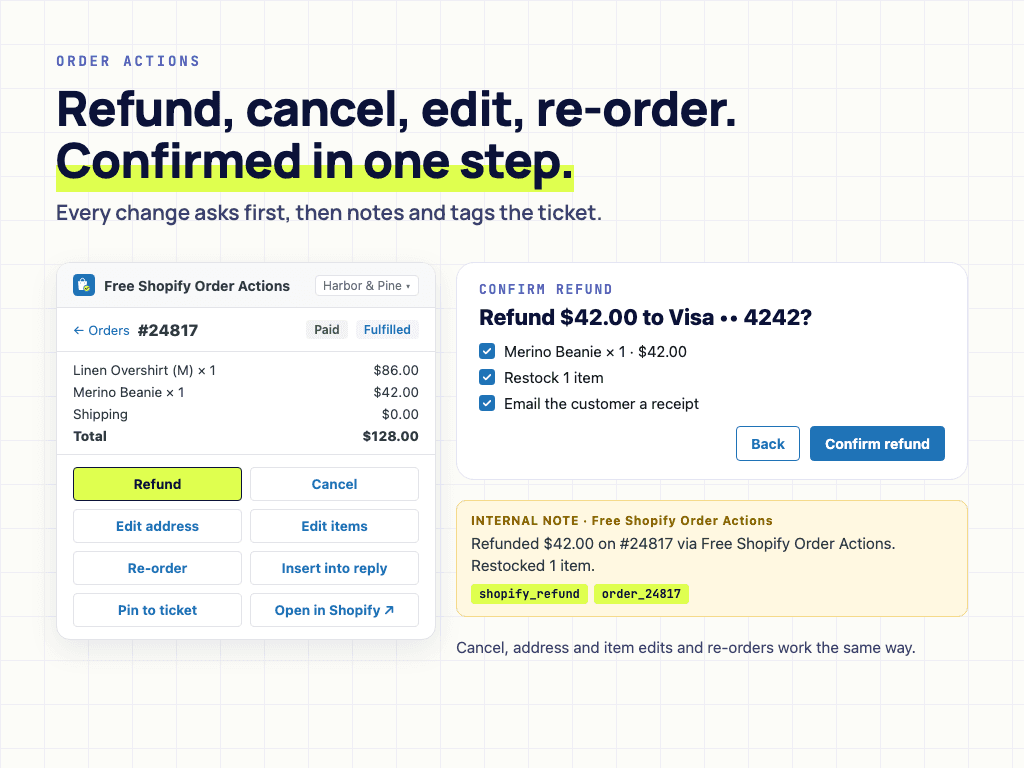
Each action shows what will happen and waits for your confirmation, then notes and tags the ticket.
Controls
The app connects through Shopify's own approval screen and acts only when an agent confirms an action. Every change is recorded on the ticket with an internal note and a tag.
A store switcher and search across them, so you don't need one sidebar app per store.
Drop the order number, status, items and tracking link into your reply, and pin the order to the ticket for the next agent.
Orders show before a ticket is saved and on the customer's profile. It runs on Support-only plans with no Chat licence needed.
Install through Zendesk Marketplace and keep procurement simple.
SOC 2, ISO 27001, GDPR, and HIPAA documentation is available for review.
Customer content is processed for the workflow and is not used to train models.
Pricing
Start from the marketplace plan, then move to enterprise support when security review, custom terms, or higher-touch support become part of the buying process.
Free plan
Every feature, for unlimited agents and stores.
Enterprise plan
For teams whose security and legal review needs paperwork and support guarantees.
FAQ
Short answers for setup, pricing, security, and control.
Marketplace ready
Start from Zendesk Marketplace, then book a setup call if you want help matching the app to your team’s ticket workflow.